

Learn by doing
Walkthroughs
Short, step-by-step setup guides. Each one ends with a working result and links its official sources.
Learn by doing
Short, step-by-step setup guides. Each one ends with a working result and links its official sources.
Save instructions for a task you repeat, then update them as your requirements change.
Claude reads and runs skills with its code execution tool. On Free, Pro, and Max, turn on Code execution and file creation in Settings > Capabilities. On Team and Enterprise, an owner controls code execution and custom skills in Organization settings > Plugins & skills.
A tested Claude skill, turned on, that you know how to update.
Member starter
Members onlyCopy the directions into Claude. Your agent can help with the setup; the steps below explain what to do and what to check.
New here? View membership
A skill saves instructions for work you want Claude to repeat, such as meeting recaps: what to read, what to produce, and what to check. When the skill is on, Claude can use it whenever a request matches its description (a short summary of what the skill does and when to use it), or when you name it: “Use meeting-recap with these notes.”
Describe the recurring job and your current requirements, then ask Claude to use skill-creator, a skill Anthropic provides for writing skills, to save a first version. An earlier example helps if you have one. Turn the skill on in Customize > Skills, try it with fresh notes in a new conversation, and review the recap. When you find a better approach or adopt new requirements and standards, update the skill and test again.
If you explain the same recap format every week, a skill saves those instructions so Claude can reuse them whenever you ask for that kind of work. For meeting recaps, your first requirements might be to list decisions, name the owner of each agreed action, and keep unanswered questions separate. An earlier recap you liked also shows Claude the result you want.
Tell Claude what to do with your meeting notes and what the recap should include. If an earlier conversation has useful instructions or examples, paste the useful part here. Ask Claude to repeat back the task and the recap sections before it builds anything.
Check: Claude restates the task and what each recap should include.
For a personal writing skill, give Claude your own writing. Ask it to show you the preferences it guessed before saving them.
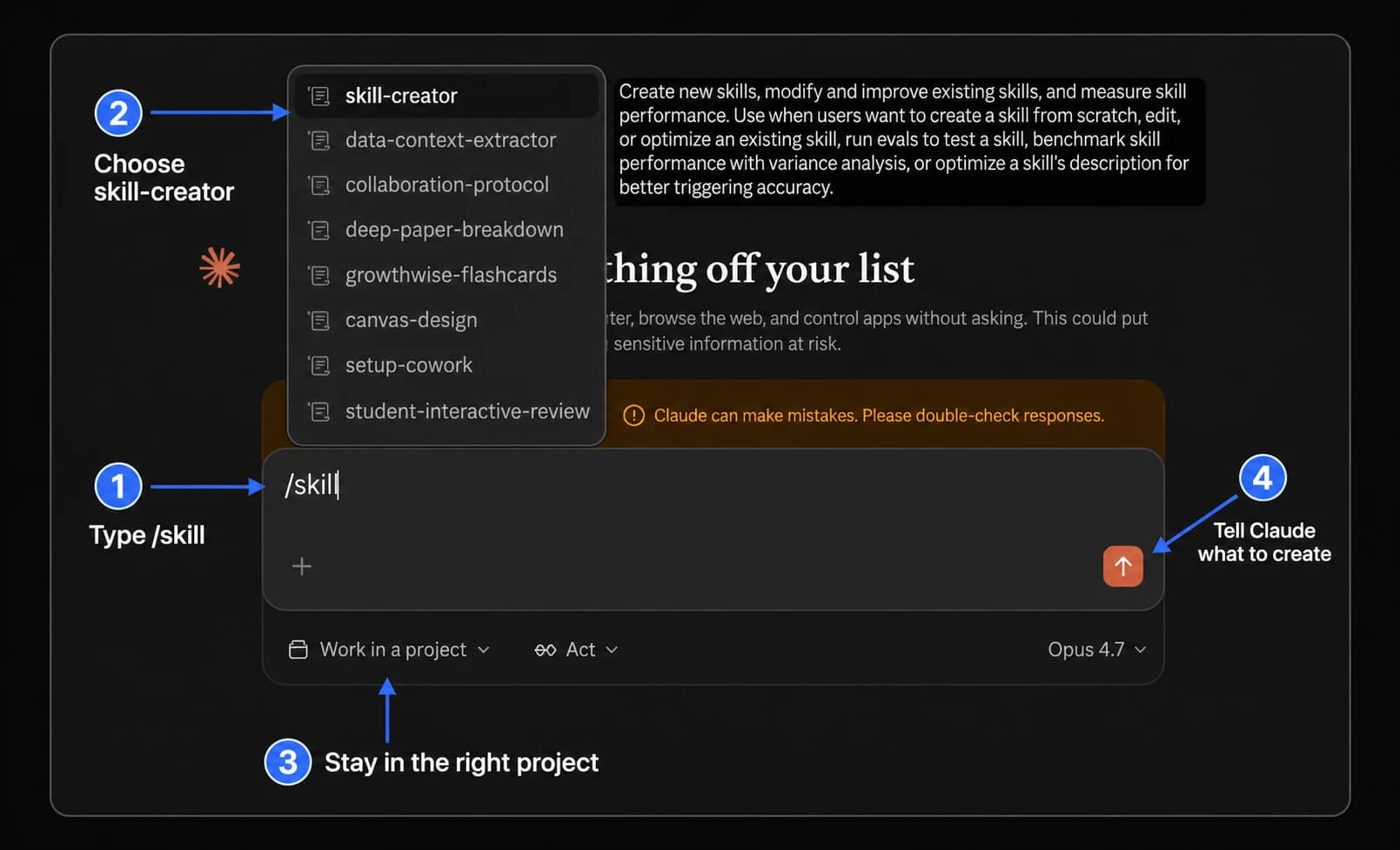
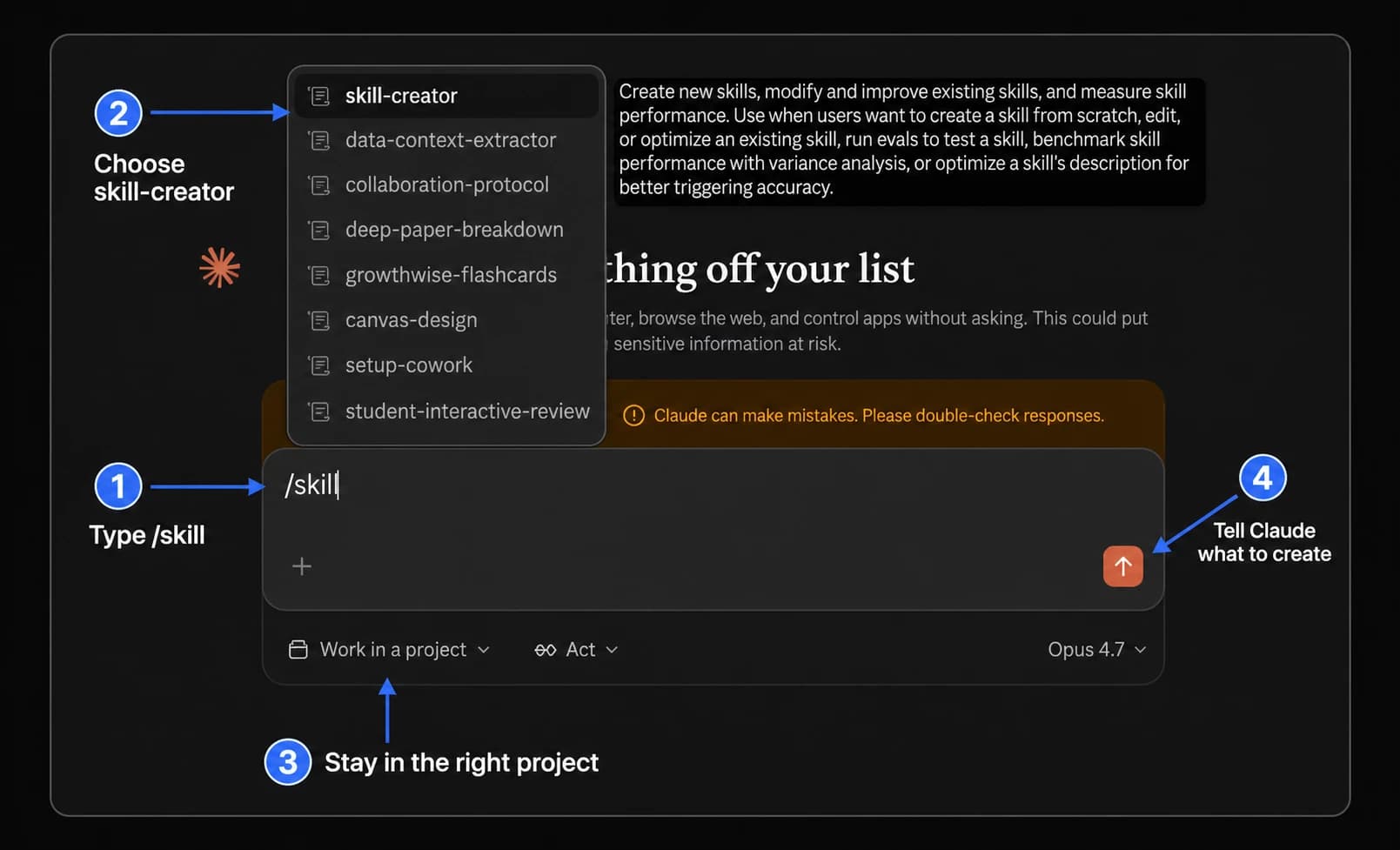
Claude can write the skill for you. skill-creator, a skill Anthropic provides for drafting, testing, and revising skills, builds the first version from the task, the meeting notes you will give it, and the recap you expect.
Ask: “Use skill-creator to create a reusable meeting-recap skill from the task and requirements I described. Include the checks we should use to review each recap.”
Check: Claude drafts the skill and the checks for reviewing each recap.
In the Claude app, ask for skill-creator by name, whether you use chat, Cowork (Claude’s mode for multi-step tasks), or the newer single conversation. In Claude Code, Claude’s coding tool, run /plugin install skill-creator@claude-plugins-official, then type /skill-creator.
A new conversation can use the skill only after it is added and turned on. Its name, such as meeting-recap, is how you ask for it. Its description, a short summary skill-creator writes, tells Claude what the skill does and when to use it.
Check the name skill-creator chose, such as meeting-recap (lowercase letters, numbers, and hyphens), and ask it to rename the skill if needed. Add the skill in Customize > Skills and check that its toggle is on; Claude can guide you. If Claude gives you a skill file, use the save option on its file card if one appears. If it gives you a ZIP file, choose + > + Create skill > Upload a skill.
Check: The skill appears in your Skills list with its toggle on.
Check that the description says the skill summarizes meeting notes and does not draft replies to attendees. If either part is missing, ask skill-creator to add it.
The skill has to work without the conversation where you built it, so test it in a new one. Notes with different decisions or missing details show whether the instructions cover new cases. When you find a better approach or your requirements change, revise the skill and test again.
In a new conversation, ask Claude to use meeting-recap with fresh notes and review the recap. Then try one request that should use the skill without naming it, and one that should not, and check Claude’s response or thinking to confirm whether it loaded meeting-recap. Ask skill-creator to save any improvements, and test again.
Check: In a new conversation, Claude uses meeting-recap for recap requests, and the recap meets your saved requirements.
If Claude uses the skill when it should not, skips it when it should, or writes a recap that misses a requirement, give skill-creator the failing example and ask it to revise and retest.
Check that the skill is turned on in Customize > Skills, then ask Claude to use it by name. If that works, ask skill-creator to make the description clearer about when to use the skill, then retest.
Make one skill for each kind of result: meeting recaps, status emails, and expense summaries should usually each get their own.
Check that code execution is on and Claude can open the files the skill names. If the skill includes scripts (small programs Claude runs) or files the task does not need, ask skill-creator to remove them.
The dates below show when each official source was checked against the steps on this page.