Becoming an AI Power User
Becoming an AI Power User
124 min leftPage 155 of 223 (est.)
5.2Infrastructure and Learning Systems
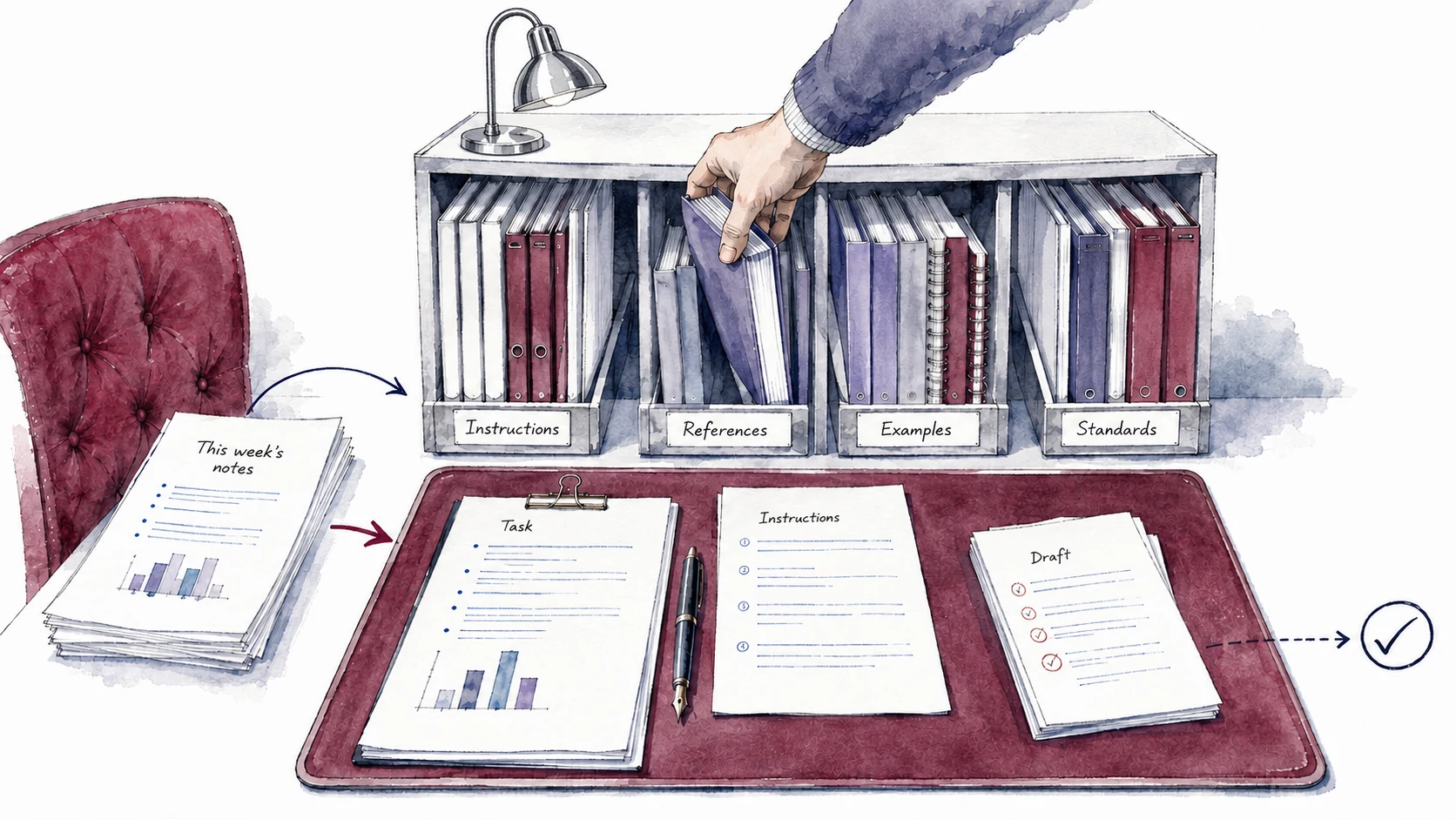
They package instructions, references, and standards into workspaces that prepare recurring tasks
Developing

A gives a recurring task a prepared place to begin.
Separate what stays the same from what changes each time. For a client update, the audience and writing standards may stay stable while progress, risks, and deadlines change weekly. Put the standing context in the and retrieve the latest project facts for each draft. Projects, configured assistants, and instruction files offer different implementations; the useful habit is preparing the context once and keeping its changing parts current.
Workspaces gather five kinds of context, each carrying its own job
The following categories help you check what your recurring task needs. They are an organizing aid, and one file may serve several purposes. A style guide can be both a reference and a quality standard; a saved example may explain a rule more clearly than another paragraph of instructions.
- Standing instructions describe the task, audience, format preferences, and recurring constraints. For the client update, explain that non-technical executives need progress, risks, and decisions. Project instructions are a product feature; they do not necessarily occupy the API role called a system message.
- Reference documents carry the style guides, briefs, scope documents, and process notes the work leans on. The model can read these without you pasting them into every prompt. For the client update, this is the project scope document and the client's communication-preferences note.
- Quality standards describe what to check before accepting the output. For the client update, ask the assistant to check material risks, supported deadlines, and clear next steps. Saving the standard communicates what you want; a tested review step provides evidence that it was applied.
- Examples of good output show how your requirements work together. For the client update, use earlier updates that demonstrate your intended tone and emphasis and explain what makes each effective. Examples can clarify tone and emphasis, while explicit rules help the assistant adapt when a new case differs.
- Prompt starters carry pre-written prompts for the most common tasks in the workflow. You pick a starter instead of composing from scratch, and each one already includes the context, constraints, and follow-up instructions. For the client update, this is one starter that takes your raw notes and produces the formatted update.
A useful quality standard says what the evaluator should look for. Word count is easy to check mechanically. Whether an update gives the client enough information to decide may require judgment and access to the project sources. Give the assistant a criterion, evidence to consult, and an example of a good decision request. It can then assess its draft and explain any uncertainty. Test that evaluator on known good and flawed outputs before relying on it.
Build a around recurring client-update requirements
Here is an illustrative setup for a weekly client update. In a project-based tool, save the standing instructions and attach the references. In a coding-agent , ask the agent to save those materials in the files its tool supports and verify that a fresh task can use them. The setup steps differ across products.
Compare the prepared setup with your previous approach on the same inputs. A shorter prompt is useful if the standing instructions still reach the model and the output meets the standard. If the update misses a risk, check whether the source was current, whether the assistant retrieved it, and whether the instruction explained how to report it. Those failures need different repairs.
Workspaces drift as you add to them, so plan to prune
New instructions can help one case while conflicting with another. A strict tone rule for one client may clash with a warmer rule for another; an old scope document may disagree with the current plan. Give each rule a clear scope and keep changing project facts separate from standing preferences. When results weaken, ask the assistant to inspect both the sources and the instructions for conflicts.
Delegate the search for stale or conflicting instructions. Ask the assistant to read the current materials and report each suspected problem beside the passages that support it. It can also check a recent output against the standards. Test whether this review catches known problems before relying on it, and verify proposed corrections before changing the setup. Revisit the review when the source material or the work changes.
Test useful corrections before adding them to the . Ask the assistant to compare a proposed rule against several relevant examples, including one that already worked. A good change can clarify a recurring need; an overbroad one can create conflict. Keep experimenting with new possibilities and preserve the changes that serve the work.
Once a exists, power users often run several focused conversations inside or alongside it. A larger piece of work might use one conversation for research, another for critique, and another for drafting, using the instructions and references relevant to their assignments. The next chapter examines how to keep a useful setup portable and test it with another capable tool.
Build your first this week
Design a reusable workspace for your recurring workflow
Claude asks about a recurring workflow and drafts standing instructions, a reference checklist, quality standards, and a starter prompt. You check the proposed setup against your work before loading it into your chosen tool.
- Copy the promptUse the copy button above the box.
- Paste it in Claude or CodexMake sure your active project is enabled.
- Answer the questionsGive clear answers so it understands what you want made.
- Test it to see if it worksTry the output and refine until it does what you need.
Problem: I repeatedly supply the same background and standards for a recurring AI task.
Intent: I want to prepare a reusable workspace while keeping each task's changing facts current.
Help me design the workspace; do not perform the recurring task yet.
Ask about the task, audience, tool I use, recurring requirements, and mistakes I keep correcting. Request actual instructions, reference documents, and examples that show what I mean. Group related questions into short exchanges and use my answers before asking for more. If a necessary source is missing, explain what is needed and ask me to provide or connect it.
Draft:
- Standing instructions for the task, audience, format, tone, and recurring constraints, using only requirements I state or confirm.
- A reference checklist explaining which documents are needed and which facts must be refreshed for every run. Distinguish documents I have supplied from sources still needed.
- Quality standards separating mechanical checks from judgments. For each judgment, state the evidence to inspect and use an example from my work when available.
- A starter prompt that requests the changing inputs and directs the assistant to the relevant standing material.
- A loading check for my chosen tool, including what to do when a required source is unavailable.
- A comparison test using the same inputs with my previous approach and the workspace. Compare quality and total effort, including setup, review, and correction.
- Review triggers and a method for testing proposed instructions against both failed and previously successful cases.
Return the setup in sections I can copy into my tool. Show the evidence behind inferred personal preferences and ask me to confirm them before treating them as standing instructions. If I have not chosen a tool, keep the draft portable and identify the loading behavior still to verify. Do not change workspace settings or save personal standards during this design exercise.
References
1 source- 1
Anthropic · 2026 · Anthropic Help Center; documentation checked September 4, 2026
In projects using retrieval, Claude searches the uploaded knowledge for relevant information. Storing a document does not mean its entire contents are present in every conversation.
Test whether the workspace retrieves the source material required for the current task.
This describes one product mechanism. Other tools load or retrieve project material differently, and product behavior can change.