Becoming an AI Power User
Becoming an AI Power User
49 min leftPage 196 of 223 (est.)
6.2Workflow Redesign, Creativity, and Growth
They redesign entire workflow sequences around AI instead of just speeding up individual steps
Developing

Improving a step and improving the whole workflow are different questions. A quicker research summary is useful only if it helps the next decision or reduces the total effort required. AI may let you remove a handoff, check a source earlier, or prepare independent inputs at the same time. New possibilities also come from play: a client briefing might include a useful comparison you previously lacked time to make. Once a sequence works on representative cases, save its instructions and checks to support supervision and improvement of the whole workflow.
The same collaboration skills apply across a whole workflow
The skills you use in one conversation also help when several steps belong together. For a client proposal, means giving each step the relevant client notes and sources. Dialogue helps refine the proposed approach. helps decide which research or drafting tasks an agent can handle reliably. Saved instructions and examples help the next proposal begin with what already worked. These skills apply at either scale, depending on the job.
Start by defining what counts as a finished proposal: it addresses the client's stated problem, supports factual claims with sources, and includes only feasible, authorized commitments. Then trace what each step must supply for that result. Ask AI to check its draft against those criteria, and use source checks or a separate review where a self-check could repeat the original mistake. The complete result tells you whether the sequence is useful.
Include preparation, checking, and handoffs when comparing workflows
Drafting an email, summarizing a meeting, or formatting a report can each become easier with AI. Keep those local improvements. To decide whether a larger redesign would speed up the whole job, count the preparation, checking, waiting, and corrections around them as well. Saving drafting time while doubling review time may leave the whole job slower.
Measure the result across the complete job. For a proposal, compare the time to an accurate, usable document, including research and review. Also compare what the document contains: a redesigned sequence might reveal a missing client requirement earlier or make a useful alternative affordable to explore. Time is one outcome; quality and new possibilities belong in the comparison too.
Erik Brynjolfsson, Daniel Rock, and Chad Syverson explain in their Productivity J-Curve paper (opens in a new tab) how investments such as training and process redesign can be missed in productivity measures before their later benefits appear. The practical reminder is to count setup effort and continuing benefits separately. The paper concerns economic measurement; it does not establish how many attempts your workflow needs or guarantee that an awkward redesign will eventually improve the work.
Coordination costs belong beside quality in a delegation decision. Suppose AI has gathered the source notes and will draft the proposal. Having a person reformat every note between those steps may add delay without improving the proposal. If the person instead spots a mistaken client requirement, that intervention can prevent substantial rework. Compare the complete result with and without the handoff, then keep the arrangement that meets your standard.
A proposal example shows what changes in the sequence
How to map and redesign a workflow
Workflow redesign follows a simple process:
- Map the current workflow. List every step in the recurring process: what happens, in what order, and how long each step takes. Include the steps you do manually, the steps you delegate, and the steps you skip or do poorly.
- Identify which steps AI changes. For each step, ask: can AI do this entirely? Can AI do a first pass? Can AI make the inputs for this step available earlier? Can AI eliminate this step by producing the output differently?
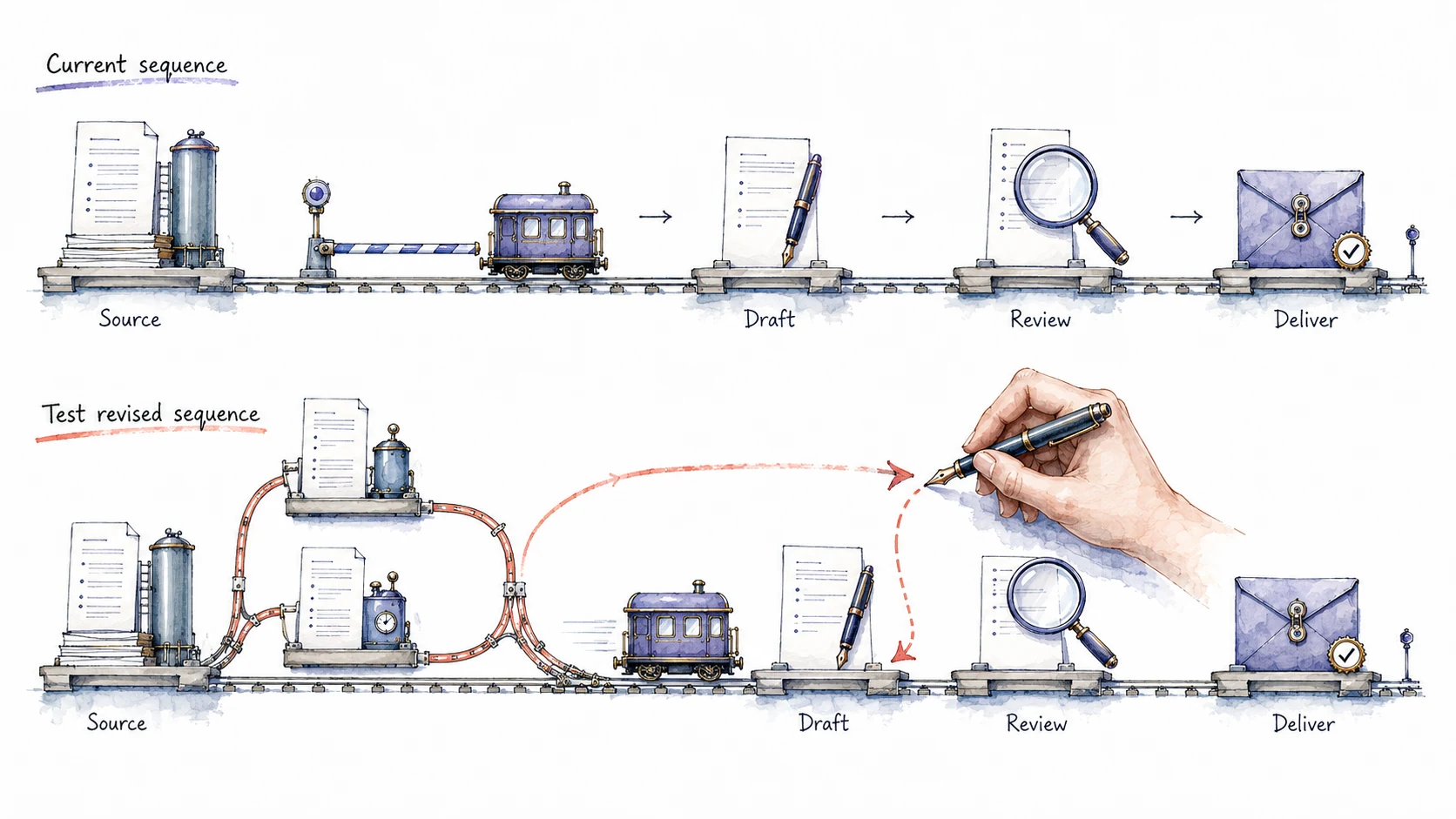
- Redesign the sequence around its dependencies. Identify which steps can begin with the inputs already available, which must wait, and which could be combined or removed. In the proposal example, research and workshop alternatives can proceed while the client confirms the group size; final pricing waits. If you use separate conversations, assign each a defined output and tell a coordinating conversation how to combine the results.
- Test the redesigned workflow from input to reviewed result. Use a real task to exercise the complete sequence. Ask AI to compare the result with your done criteria and identify gaps. Record elapsed and review time from the run; do not ask it to invent timings. Check any consequential claim against the source before accepting the assessment.
- Save the sequence once it works across representative cases. Record its prompts, required inputs, boundaries, and completion checks. This is an abstraction jump: the request names the established workflow, which handles its steps without repeated direction. Ask AI to propose changes from later failures or new requirements, then test those changes before updating the saved version. Expand its authority only when the evidence and the task's rules support that decision.
Independent steps can run in parallel
Some steps become faster; some can happen earlier; some can run at the same time. These are possibilities to investigate. A new tool does not remove a dependency when one step still needs information produced by another.
Run steps in parallel when they have the inputs they need. In the proposal example, source gathering and draft workshop alternatives can proceed while you wait for the client to confirm group size. Final pricing still depends on that answer. Separate AI conversations can divide the preparation, but they cannot supply a missing client decision.
Ask AI to mark which steps share an input, which produce an input for another step, and which can finish independently. In a set of parallel conversations, give each one its job and tell a coordinating conversation how to combine the results. If two conversations both assume the other has checked a claim, parallel work has created a gap rather than removed a delay.
Continue a redesign when the evidence shows a useful improvement
The proposal example looks clean on paper. An early attempt may expose a missing input: the client confirms the group size but still has not decided whether the workshop will be remote. The AI might also include an unsupported claim in its industry summary. Ask it to identify the unresolved dependency and check the claim against the source, then revise the proposal or request the missing answer.
A later cycle improves when you correct a problem the earlier one revealed. In the proposal example, saving the dependency check can prevent the next draft from assuming a group size. Keep trying while those corrections improve quality or reduce effort. If the new sequence keeps adding review work without a useful gain, simplify it or return to the parts of the earlier workflow that performed better. No particular cycle number guarantees an improvement.
Every decision point needs an owner before the agent starts
Before delegating, state which decisions the agent may make, where another check is required, how intermediate results are passed along, and what counts as done. For the proposal, the agent can draft workshop options from confirmed notes; a price must come from the agreed pricing method. That distinction gives the agent a usable instruction and gives the reviewer a specific check.
Model capability and the setup around it both affect the outcome. Missing source access, unclear authority, or contradictory instructions can defeat an otherwise capable model. Give the agent a way to report a missing input or failed check, and define what should happen next, such as asking for the client decision before completing the proposal.
Define what data the agent may read, which tools it may use, and which actions it may take. For the proposal, it may read the client notes you supply and draft workshop options in the chosen . Sending the proposal or making a commitment requires separate authority. State that boundary alongside the task so useful preparation can continue while a missing client decision remains unresolved.
A simple pre-flight checklist for agent delegation:
- What does the agent decide? List the specific judgments you are delegating. 'Write the first draft' is a delegation. 'Decide what to include' is a different delegation with a different risk profile.
- What stays with you? List the decisions where your judgment currently gets the better aligned result, or where policy or the consequences require your approval. These are your review checkpoints. Delegate more as evidence establishes the reliability of the agent’s judgment.
- Where are the handoffs? Define the format and location where the agent delivers intermediate or final output for your review.
- What counts as done? Write down the criteria you will use to evaluate the agent's output. If you cannot articulate 'done,' the agent cannot hit a target that does not exist.
The decision points help you choose how to collaborate. You might delegate a source summary, divide research and drafting between person and AI, or work together on the proposal's scope through successive questions and revisions. Choose the arrangement for each step from the inputs available and the checks needed, then assess how the steps work together.
Locate recurring delays before redesigning a workflow
Redesign the dependencies and handoffs in recurring work
Claude analyzes your current workflow step by step and proposes a redesigned sequence. You review the before-and-after comparison and test it on the next real cycle.
- Copy the promptUse the copy button above the box.
- Paste it in Claude or CodexMake sure your active project is enabled.
- Answer the questionsGive clear answers so it understands what you want made.
- Test it to see if it worksTry the output and refine until it does what you need.
Problem: Faster individual steps may still leave delays, corrections, or difficult handoffs in a recurring workflow.
Intent: I want to test whether a different sequence would improve the complete result.
Ask which recurring process I want to examine and what a useful finished result must satisfy. Ask for a recent example and a description of how I handled it. Help me reconstruct the steps in short exchanges: what each step needed, what it produced, who handled it, where I waited or corrected work, and any steps I skipped. Use measured times where I have them; leave unknown timings unknown.
Before proposing changes, ask about constraints that affect the design: available tools and sources, colleagues who must participate, decisions or commitments that require approval, and data or actions outside the agent's scope. Use my answers and supplied policy; do not invent permission.
1. Map the current workflow with inputs, outputs, responsibilities, timing, and dependencies.
2. Assess where AI could draft, prepare inputs, check work, or handle a step. Distinguish demonstrated capability from an assumption to test. Verify consequential tool requirements against current official documentation when possible; mark anything unverified.
3. Show the current and proposed sequences side by side. Explain which changes could improve individual steps and which depend on reordering, combining, removing, or running steps in parallel. A step can run independently only when it has the inputs it needs and does not depend on another unfinished result.
4. State who handles each step, who checks its result, and how results reach the next step. Include what happens when an input is missing or a check fails.
5. Draft a test plan using a representative task. Compare the complete result against my completion criteria, including quality, elapsed time, preparation, review, and corrections. Label expected benefits as estimates until measured.
6. Draft the proposed workflow's instructions and checks for use in that test. Mark it as untested and identify what evidence would support keeping, simplifying, or abandoning the changes. Include cases to check before treating it as dependable recurring work.
Scope: design the workflow and test plan only. Do not execute steps, contact colleagues, or save instructions. If a reusable instruction records my personal preferences or habits, show the supporting material and ask me to confirm it before any later saving.
References
3 sources- 1
Mert Demirer, John J. Horton, Nicole Immorlica, Brendan Lucier, Peyman Shahidi · 2026 · NBER Working Paper 34859
The authors model how specialization and coordination costs affect the assignment of humans and AI across connected steps. Their evidence supports predictions that AI-executed steps cluster and that neighboring steps affect the likelihood of AI execution.
Evaluate a proposed AI step together with its inputs and handoffs. A locally better assignment may be worse for the whole job if the handoff adds substantial effort.
This working paper offers a model and evidence about task patterns. It does not establish a universal gain from redesign or show that any particular decision should be automated.
- 2
Microsoft, LinkedIn · 2024
Survey respondents classified as power users were 66% more likely to report redesigning business processes and workflows with AI than other respondents.
Workflow redesign appeared among the habits of frequent, self-reported effective users in this survey. It is a practical possibility to test in your own work.
This historical association does not show that redesign caused higher productivity or predict how much time your workflow will save.
- 3
Eleanor Wiske Dillon, Sonia Jaffe, Nicole Immorlica, Christopher T. Stanton · 2025
In a randomized workplace experiment, access to an integrated AI assistant reduced measured time in Outlook. The study found no significant average change in scheduled Microsoft Teams meeting time. The authors suggest that changing shared activities may require coordination with colleagues.
Some changes fit inside one person's work; others depend on colleagues changing the sequence together. Check who must participate in your proposed redesign.
The experiment tracked activity inside Microsoft applications during the product's early release; it could not observe all work or directly measure output quality. It did not test this chapter's proposal workflow or establish that team benefits would appear after a longer wait.